> ## Documentation Index
> Fetch the complete documentation index at: https://docs.totalis.trade/llms.txt
> Use this file to discover all available pages before exploring further.
# Authentication
> Scoped API keys: how to get one, how to send it, the scope catalog, and how to manage and revoke keys.
Every authenticated request carries your API key. On REST and the quote streams, send it in the
`X-API-Key` header. On the WebSocket, send it in the first message. Keys are scoped, so a key can
read without being able to trade, and trade without being able to withdraw.
## Getting your API key
Open [app.totalis.trade](https://app.totalis.trade) and go to your account settings.
Name it and choose its scopes. Grant only what this integration needs. The presets map to the
[scopes](#scopes) below: **Read-only** is the four read scopes, **Trading** adds `trading:write`
and `funds:deposit`, and **Custom** lets you tick scopes one by one. The API also accepts a
`full` preset. See [Create API key](/solana/api-reference/user/create-api-key).
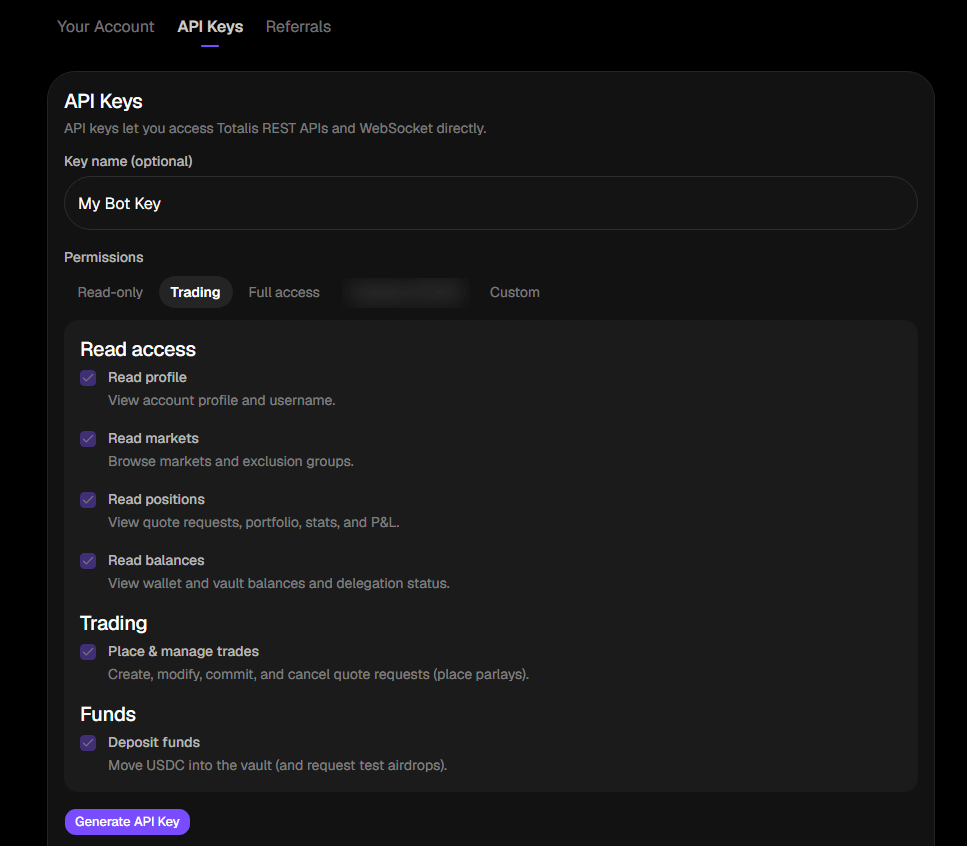 The full key is returned exactly once, in `data.key`.
 Store the key in a secret manager before you close the dialog. It cannot be retrieved later, only
revoked and replaced.
Keys match `api_(live|test)_[A-Za-z0-9_-]{28,36}`. Every key you create is a live key and starts
`api_live_`. There is no public test environment. Start with small real bets, or email
[founders@totalis.trade](mailto:founders@totalis.trade) if you need a staging setup.
The web app authenticates with a Privy JWT (`Authorization: Bearer `) instead of a key. Every
endpoint accepts either. Creating, listing and revoking keys needs `keys:manage`. A Privy session
always holds it. A key holds it only if you granted it.
## Using your API key
```bash theme={null}
curl https://api.totalis.trade/v1/portfolio \
-H "X-API-Key: $TOTALIS_API_KEY"
```
On the WebSocket, authenticate after connecting:
```json theme={null}
{ "type": "auth", "api_key": "" }
```
A credential that does not start with `api_` gets `403` with reason `wrong_api_key_type`. A
well-formed but invalid or revoked key gets `401`. See [Errors](/solana/errors#authentication).
## Scopes
A key holds the scopes you chose at creation. A request that needs a scope the key lacks gets `403`
with reason `insufficient_scope`.
| Scope | Grants | Risk |
| - | - | - |
| `account:read` | View account profile and username. | low |
| `markets:read` | Browse markets and exclusion groups. Market reads are public today, so no public endpoint checks it. | low |
| `positions:read` | View quote requests, parlays, stats, and P\&L. Portfolio also needs `balances:read`. | low |
| `balances:read` | View wallet and vault balances and delegation status. | low |
| `funds:deposit` | Move USDC into the vault. | low |
| `trading:write` | Create, modify, commit, and cancel quote requests. Places parlays. | medium |
| `account:write` | Change username and profile settings. | medium |
| `mm:quote` | Read quote requests and submit or confirm quotes as a market maker. | medium |
| `funds:withdraw` | Move USDC out of the vault or wallet to any address. | **high** |
| `tx:sign` | Submit arbitrary signed Solana transactions. | **high** |
| `keys:manage` | Create, list, and revoke API keys. | **high** |
Each high-risk scope lets a leaked key take everything. `funds:withdraw` sends USDC to any address.
`tx:sign` submits arbitrary transactions. `keys:manage` mints more keys, including ones that outlive
your revocation of the original. Grant them only to keys that need them, and never to a key that
lives in a browser or a CI log.
Scopes by integration:
| Integration | Scopes |
| - | - |
| Dashboard or reconciliation, read only | `account:read`, `positions:read`, `balances:read` |
| Trading bot | the four read scopes, plus `trading:write`, plus `funds:deposit` if it tops up the vault |
| Market maker | the four read scopes, plus `mm:quote`, plus `funds:deposit` if you park collateral in the vault |
## Managing keys
| Action | Endpoint |
| - | - |
| List keys | [`GET /v1/api-keys`](/solana/api-reference/user/list-api-keys) |
| Create key | [`POST /v1/api-keys`](/solana/api-reference/user/create-api-key) |
| Revoke key | [`DELETE /v1/api-keys/{prefix}`](/solana/api-reference/user/revoke-api-key) |
`{prefix}` is the `key_prefix` value returned by both list and create: the short leading fragment
that listings show in place of the full secret. The app shows each key's prefix, scopes, request
count and state, with a Revoke control on active keys.
Store the key in a secret manager before you close the dialog. It cannot be retrieved later, only
revoked and replaced.
Keys match `api_(live|test)_[A-Za-z0-9_-]{28,36}`. Every key you create is a live key and starts
`api_live_`. There is no public test environment. Start with small real bets, or email
[founders@totalis.trade](mailto:founders@totalis.trade) if you need a staging setup.
The web app authenticates with a Privy JWT (`Authorization: Bearer `) instead of a key. Every
endpoint accepts either. Creating, listing and revoking keys needs `keys:manage`. A Privy session
always holds it. A key holds it only if you granted it.
## Using your API key
```bash theme={null}
curl https://api.totalis.trade/v1/portfolio \
-H "X-API-Key: $TOTALIS_API_KEY"
```
On the WebSocket, authenticate after connecting:
```json theme={null}
{ "type": "auth", "api_key": "" }
```
A credential that does not start with `api_` gets `403` with reason `wrong_api_key_type`. A
well-formed but invalid or revoked key gets `401`. See [Errors](/solana/errors#authentication).
## Scopes
A key holds the scopes you chose at creation. A request that needs a scope the key lacks gets `403`
with reason `insufficient_scope`.
| Scope | Grants | Risk |
| - | - | - |
| `account:read` | View account profile and username. | low |
| `markets:read` | Browse markets and exclusion groups. Market reads are public today, so no public endpoint checks it. | low |
| `positions:read` | View quote requests, parlays, stats, and P\&L. Portfolio also needs `balances:read`. | low |
| `balances:read` | View wallet and vault balances and delegation status. | low |
| `funds:deposit` | Move USDC into the vault. | low |
| `trading:write` | Create, modify, commit, and cancel quote requests. Places parlays. | medium |
| `account:write` | Change username and profile settings. | medium |
| `mm:quote` | Read quote requests and submit or confirm quotes as a market maker. | medium |
| `funds:withdraw` | Move USDC out of the vault or wallet to any address. | **high** |
| `tx:sign` | Submit arbitrary signed Solana transactions. | **high** |
| `keys:manage` | Create, list, and revoke API keys. | **high** |
Each high-risk scope lets a leaked key take everything. `funds:withdraw` sends USDC to any address.
`tx:sign` submits arbitrary transactions. `keys:manage` mints more keys, including ones that outlive
your revocation of the original. Grant them only to keys that need them, and never to a key that
lives in a browser or a CI log.
Scopes by integration:
| Integration | Scopes |
| - | - |
| Dashboard or reconciliation, read only | `account:read`, `positions:read`, `balances:read` |
| Trading bot | the four read scopes, plus `trading:write`, plus `funds:deposit` if it tops up the vault |
| Market maker | the four read scopes, plus `mm:quote`, plus `funds:deposit` if you park collateral in the vault |
## Managing keys
| Action | Endpoint |
| - | - |
| List keys | [`GET /v1/api-keys`](/solana/api-reference/user/list-api-keys) |
| Create key | [`POST /v1/api-keys`](/solana/api-reference/user/create-api-key) |
| Revoke key | [`DELETE /v1/api-keys/{prefix}`](/solana/api-reference/user/revoke-api-key) |
`{prefix}` is the `key_prefix` value returned by both list and create: the short leading fragment
that listings show in place of the full secret. The app shows each key's prefix, scopes, request
count and state, with a Revoke control on active keys.
 A new key can never grant a scope the creating credential does not already hold. A key with
`positions:read` cannot mint a key with `funds:withdraw`.
## Key states
| State | Behavior |
| - | - |
| Active | Valid and accepted. |
| Revoked | Manually revoked. Rejected with `401`. |
| Expired | Past its expiration date. Rejected with `401`. |
Keys you create yourself never expire, so they reach the Expired state only if they were minted with
an expiry.
Revocation takes effect immediately. Revoking one key among several does not stop webhook delivery,
because webhook endpoints belong to your account, not to the key that created them. See
[Webhooks](/solana/guides/webhooks).
This documentation is built and hosted on [Mintlify](https://mintlify.com), a developer documentation platform.
A new key can never grant a scope the creating credential does not already hold. A key with
`positions:read` cannot mint a key with `funds:withdraw`.
## Key states
| State | Behavior |
| - | - |
| Active | Valid and accepted. |
| Revoked | Manually revoked. Rejected with `401`. |
| Expired | Past its expiration date. Rejected with `401`. |
Keys you create yourself never expire, so they reach the Expired state only if they were minted with
an expiry.
Revocation takes effect immediately. Revoking one key among several does not stop webhook delivery,
because webhook endpoints belong to your account, not to the key that created them. See
[Webhooks](/solana/guides/webhooks).
This documentation is built and hosted on [Mintlify](https://mintlify.com), a developer documentation platform.