> ## Documentation Index
> Fetch the complete documentation index at: https://docs.totalis.trade/llms.txt
> Use this file to discover all available pages before exploring further.
# Webhooks
> Receive HMAC-signed events when your positions settle, get bought back, or your funds move. Configure an endpoint, verify signatures, handle retries, and replay deliveries.
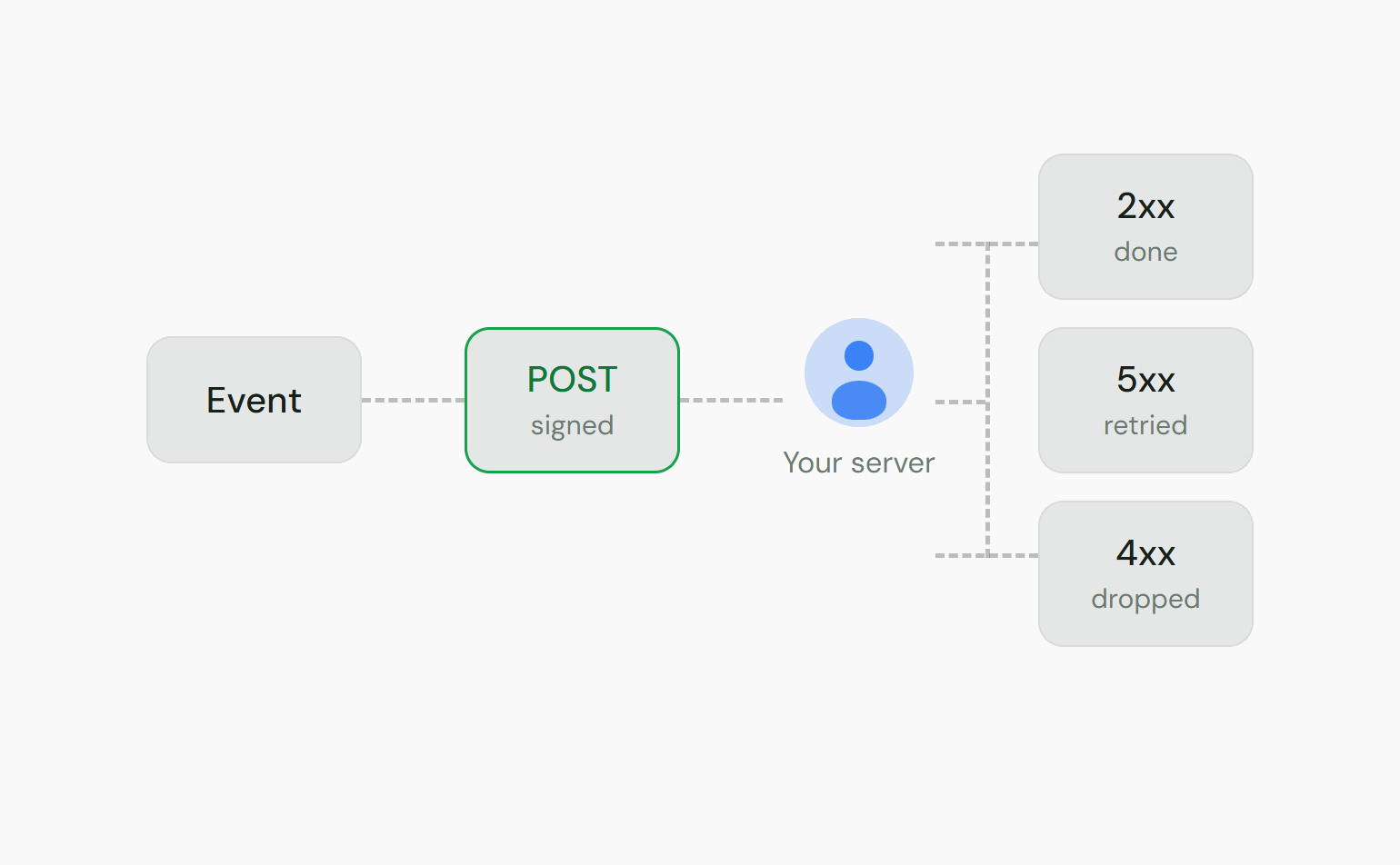
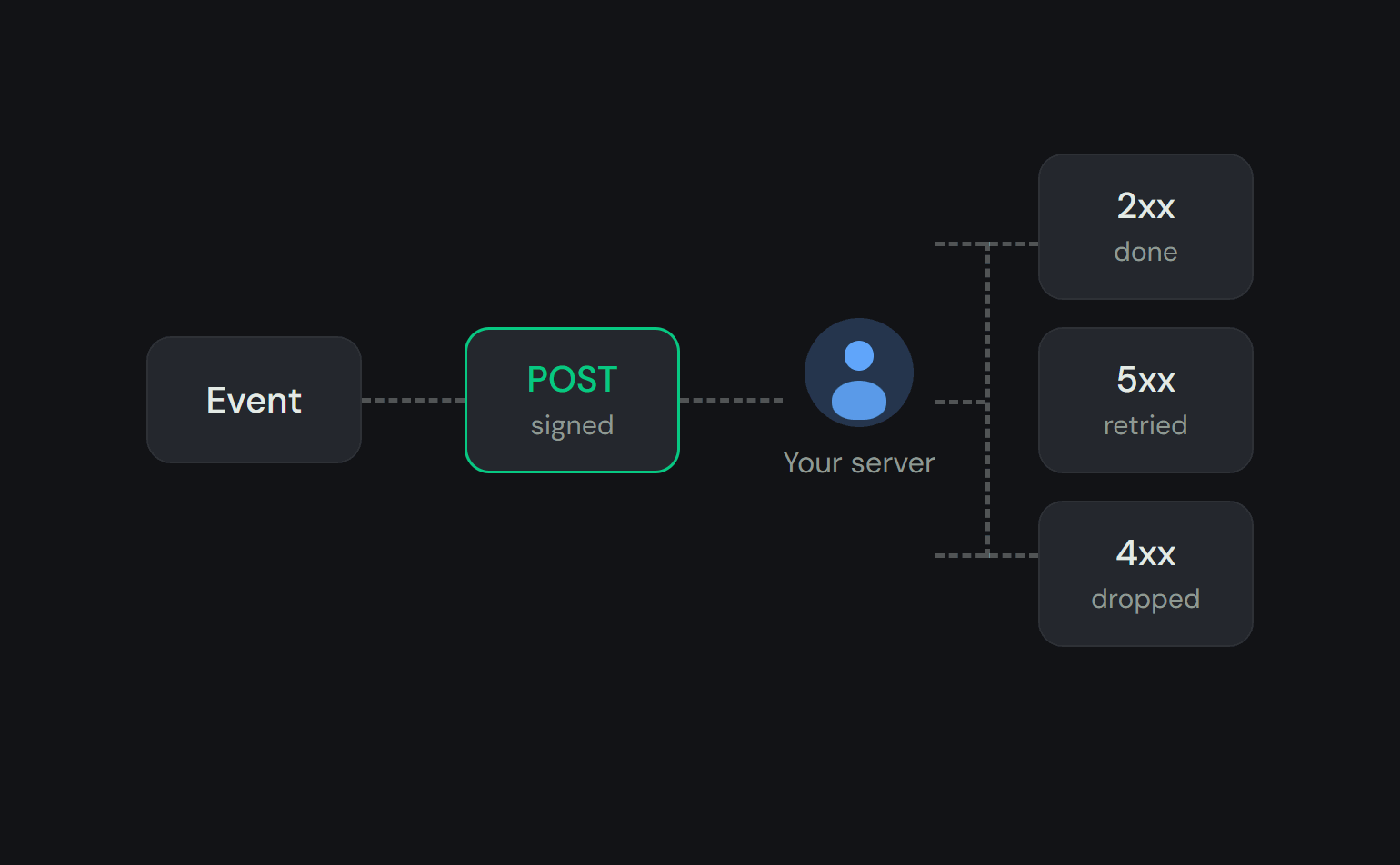
Totalis posts signed events to your server as they happen and retries failed deliveries with backoff. You
receive only the events your key's scopes allow.
Webhook delivery is still being enabled. Email [founders@totalis.trade](mailto:founders@totalis.trade)
before you build on it. Until then, follow events on the [WebSocket](/solana/guides/websocket) or by
polling.
Your endpoint belongs to your **account** (the principal), not to the key that created it. Any of
your active keys with the right scope can manage it. Revoking one key among several does not stop
delivery.
Webhooks are the durable channel. For the same events live on a connection, use the
[WebSocket](/solana/guides/websocket). [Real time and data channels](/solana/guides/realtime) compares
the two.
 ## Configuring your endpoint
Set your endpoint URL and the events you want with `PUT /v1/webhooks`. Viewing the endpoint needs
`account:read`. Changing it needs `account:write`. Maker endpoints use `mm:quote` instead (see
[Maker endpoints](#maker-endpoints)).
```bash theme={null}
curl -X PUT https://api.totalis.trade/v1/webhooks \
-H "X-API-Key: " \
-H "Content-Type: application/json" \
-d '{
"url": "https://your-server.example/totalis/webhooks",
"events": ["position.settled", "position.bought_back", "funds.withdrawn"]
}'
```
| Field | Rule |
| - | - |
| `url` | Must be HTTPS. Must not resolve to private or internal infrastructure. |
| `events` | Any subset of the [event catalog](#event-catalog). An empty array parks the endpoint without deleting it: nothing matches. |
Deliveries start only once a signing secret exists. After the `PUT`, generate one with
`POST /v1/webhooks/rotate-secret`. The secret (`whsec_...`) is shown exactly once, so store it
securely.
You receive an event only if your key holds the scope that event requires. The scope is re-checked
at delivery time, not just at subscribe time. A `position.settled` delivery needs `positions:read`.
A `funds.*` delivery needs `balances:read`.
### Maker endpoints
Market makers manage a separate endpoint by adding `?owner_kind=mm` to each webhook call. Viewing
and changing it both need `mm:quote`, in place of `account:read` and `account:write`.
A maker endpoint can subscribe only to the three events a backing maker is party to. Each `data`
carries the maker's side of the position:
| Event | Maker `data` fields |
| - | - |
| `position.settled` | `rfq_id`, `mm_id`, `mm_result` (`won` or `lost`), `outcome`, `tx_signature`, `occurred_at` |
| `position.cancelled` | `rfq_id`, `mm_id`, `reason`, `occurred_at` |
| `position.bought_back` | `rfq_id`, `mm_id`, `amount`, `mm_pays_user` (`true` when you paid the user, `false` when you collected), `tx_signature`, `occurred_at` |
A `user` endpoint, the default, receives your own bettor-side event data from the catalog below.
## Event catalog
| Event | Required scope | `data` fields |
| - | - | - |
| `position.settled` | `positions:read` | `rfq_id`, `outcome`, `tx_signature`, `occurred_at` |
| `position.cancelled` | `positions:read` | `rfq_id`, `reason`, `occurred_at` |
| `position.bought_back` | `positions:read` | `rfq_id`, `amount`, `mm_pays_user`, `tx_signature`, `occurred_at` |
| `position.transferred` | `positions:read` | `rfq_id`, `price`, `buyer_wallet`, `tx_signature`, `occurred_at` |
| `parlay.status_changed` | `positions:read` | `rfq_id`, `status`, `accepted_quote_id`, `occurred_at` |
| `funds.deposited` | `balances:read` | `amount_usdc`, `vault_balance`, `occurred_at` |
| `funds.withdrawn` | `balances:read` | `amount_usdc`, `vault_balance`, `occurred_at` |
* **`position.bought_back`**: `amount` is what moves between you and the maker on top of your released stake,
before the profit fee. `mm_pays_user` gives the direction. The seller always receives exactly the
accepted price.
* **`position.transferred`**: seller side only. Your position was taken over by a winning cashout
bid from a maker other than the one backing it.
* **`parlay.status_changed`**: tracks an RFQ's live progression. `status` is one of `accepted`,
`confirmed`, `executed`, or `cancelled`. `accepted_quote_id` is set once a quote is accepted, else
`null`. Settlement comes via `position.settled`, and expiry isn't part of this event, so use the
`position.*` events for final outcomes.
A cancellation fires both `parlay.status_changed` (`status: "cancelled"`) and `position.cancelled`.
The two carry different event ids. If you subscribe to both, match them on `rfq_id`.
## Delivery format
Each delivery is an HTTP `POST` with a JSON body and these headers:
| Header | Description |
| - | - |
| `X-Totalis-Signature` | `t=,v1=`. See [verifying](#verifying-signatures). |
| `X-Totalis-Event-Id` | Unique event id. Use it to deduplicate. |
| `X-Totalis-Event-Type` | The event name, e.g. `position.settled`. |
| `Content-Type` | `application/json` |
The body is a stable envelope: `id`, `type`, and an event-specific `data` object.
```json theme={null}
{
"id": "evt_01HZX",
"type": "position.settled",
"data": {
"rfq_id": "11111111-1111-1111-1111-111111111111",
"outcome": "user_wins",
"tx_signature": "5Hk...",
"occurred_at": "2026-06-22T00:00:00.000Z"
}
}
```
Respond with any `2xx` status to acknowledge. Anything else is treated as a failure and retried.
## Verifying signatures
The `X-Totalis-Signature` header has the form `t=,v1=`. The signature is
`HMAC-SHA256(secret, ".")`, hex-encoded. To verify:
1. Parse `t` and `v1` from the header.
2. Reject if `t` is outside your tolerance. 5 minutes either side is a good default. This blocks replay.
3. Recompute the HMAC over the exact raw request body joined to the timestamp as `t.body`.
4. Compare to `v1` with a constant-time equality check.
Compute the HMAC over the raw bytes of the request body, before any JSON parsing or
re-serialization. Re-stringifying parsed JSON can reorder keys or change whitespace and will break
the signature.
```ts Node / Express theme={null}
import { createHmac, timingSafeEqual } from "node:crypto";
export function verifyTotalisWebhook(
secret: string,
signatureHeader: string,
rawBody: string | Buffer, // express.raw() gives a Buffer; both are fine
toleranceSec = 300,
): boolean {
const fields = new Map();
for (const part of signatureHeader.split(",")) {
const i = part.indexOf("=");
if (i !== -1) fields.set(part.slice(0, i), part.slice(i + 1));
}
const t = Number(fields.get("t"));
const v1 = fields.get("v1");
if (!Number.isFinite(t) || !v1) return false;
if (Math.abs(Date.now() / 1000 - t) > toleranceSec) return false;
// Chained .update() signs "." then the raw body bytes, with no string coercion.
const expected = createHmac("sha256", secret).update(`${t}.`).update(rawBody).digest("hex");
const a = Buffer.from(expected);
const b = Buffer.from(v1);
return a.length === b.length && timingSafeEqual(a, b);
}
// Express: capture the raw body so you can sign over the exact bytes.
// app.use("/totalis/webhooks", express.raw({ type: "application/json" }));
```
```python Python / Flask theme={null}
import hmac, hashlib, time
def verify_totalis_webhook(secret: str, signature_header: str, raw_body: bytes, tolerance_sec: int = 300) -> bool:
fields = dict(p.split("=", 1) for p in signature_header.split(",") if "=" in p)
t, v1 = fields.get("t"), fields.get("v1")
if not t or not v1:
return False
if abs(time.time() - int(t)) > tolerance_sec:
return False
signed = f"{t}.".encode() + raw_body
expected = hmac.new(secret.encode(), signed, hashlib.sha256).hexdigest()
return hmac.compare_digest(expected, v1)
# Flask: use request.get_data() for the raw body, not request.json.
```
## Idempotency & ordering
* **Deduplicate on `X-Totalis-Event-Id`.** Delivery is at-least-once, so the same event can arrive
more than once: a retry of a delivery that actually succeeded, or a
[replay](#replaying-deliveries). Treat the event id as the unique key.
* **Do not assume ordering.** Process each event on its own. Use `occurred_at` to reason about
sequence.
## Retries & failure handling
If your endpoint doesn't return `2xx`, the outcome depends on the response:
| Response | Delivery status |
| - | - |
| `5xx`, `408`, `429`, timeout, network error | `failed`. Retried with exponential backoff. Once the retry budget is exhausted, `dead_letter`. |
| Any other `4xx` | `dead_letter` immediately. Your endpoint rejected it, so a retry won't help. |
Return `2xx` quickly and do heavy work asynchronously. A slow endpoint that exceeds the delivery
timeout counts as a failed attempt.
## Inspecting & replaying deliveries
`GET /v1/webhooks/deliveries` lists recent deliveries, newest first, with their status, attempt
count, and last response code:
```json theme={null}
{
"deliveries": [
{
"id": "...",
"event_type": "position.settled",
"status": "delivered",
"attempts": 1,
"response_code": 200,
"created_at": "2026-06-22T12:00:00.000Z"
}
]
}
```
### Replaying deliveries
Re-queue a `delivered` or `dead_letter` delivery with
`POST /v1/webhooks/deliveries/{id}/redeliver`. Use it to recover after fixing a bug or an outage on
your side. Replays reuse the same `X-Totalis-Event-Id`, so your deduplication recognizes them.
A `failed` delivery that is still mid-retry cannot be replayed manually. It is already scheduled
for another attempt. Wait for it to land or dead-letter.
## Rotating your signing secret
Rotate the secret any time with `POST /v1/webhooks/rotate-secret`. The new secret is shown once. The
old one stops signing immediately, with no overlap window where both are valid.
Generate the new secret. Capture it immediately, since it is shown only once.
Deploy the new secret to your endpoint as fast as possible. Deliveries signed with the new
secret fail verification until your verifier has it.
From the deliveries list, replay any `dead_letter` deliveries from the swap window, including
formerly `failed` ones once they exhaust retries. Replays are re-signed with the current secret.
This documentation is built and hosted on [Mintlify](https://mintlify.com), a developer documentation platform.
## Configuring your endpoint
Set your endpoint URL and the events you want with `PUT /v1/webhooks`. Viewing the endpoint needs
`account:read`. Changing it needs `account:write`. Maker endpoints use `mm:quote` instead (see
[Maker endpoints](#maker-endpoints)).
```bash theme={null}
curl -X PUT https://api.totalis.trade/v1/webhooks \
-H "X-API-Key: " \
-H "Content-Type: application/json" \
-d '{
"url": "https://your-server.example/totalis/webhooks",
"events": ["position.settled", "position.bought_back", "funds.withdrawn"]
}'
```
| Field | Rule |
| - | - |
| `url` | Must be HTTPS. Must not resolve to private or internal infrastructure. |
| `events` | Any subset of the [event catalog](#event-catalog). An empty array parks the endpoint without deleting it: nothing matches. |
Deliveries start only once a signing secret exists. After the `PUT`, generate one with
`POST /v1/webhooks/rotate-secret`. The secret (`whsec_...`) is shown exactly once, so store it
securely.
You receive an event only if your key holds the scope that event requires. The scope is re-checked
at delivery time, not just at subscribe time. A `position.settled` delivery needs `positions:read`.
A `funds.*` delivery needs `balances:read`.
### Maker endpoints
Market makers manage a separate endpoint by adding `?owner_kind=mm` to each webhook call. Viewing
and changing it both need `mm:quote`, in place of `account:read` and `account:write`.
A maker endpoint can subscribe only to the three events a backing maker is party to. Each `data`
carries the maker's side of the position:
| Event | Maker `data` fields |
| - | - |
| `position.settled` | `rfq_id`, `mm_id`, `mm_result` (`won` or `lost`), `outcome`, `tx_signature`, `occurred_at` |
| `position.cancelled` | `rfq_id`, `mm_id`, `reason`, `occurred_at` |
| `position.bought_back` | `rfq_id`, `mm_id`, `amount`, `mm_pays_user` (`true` when you paid the user, `false` when you collected), `tx_signature`, `occurred_at` |
A `user` endpoint, the default, receives your own bettor-side event data from the catalog below.
## Event catalog
| Event | Required scope | `data` fields |
| - | - | - |
| `position.settled` | `positions:read` | `rfq_id`, `outcome`, `tx_signature`, `occurred_at` |
| `position.cancelled` | `positions:read` | `rfq_id`, `reason`, `occurred_at` |
| `position.bought_back` | `positions:read` | `rfq_id`, `amount`, `mm_pays_user`, `tx_signature`, `occurred_at` |
| `position.transferred` | `positions:read` | `rfq_id`, `price`, `buyer_wallet`, `tx_signature`, `occurred_at` |
| `parlay.status_changed` | `positions:read` | `rfq_id`, `status`, `accepted_quote_id`, `occurred_at` |
| `funds.deposited` | `balances:read` | `amount_usdc`, `vault_balance`, `occurred_at` |
| `funds.withdrawn` | `balances:read` | `amount_usdc`, `vault_balance`, `occurred_at` |
* **`position.bought_back`**: `amount` is what moves between you and the maker on top of your released stake,
before the profit fee. `mm_pays_user` gives the direction. The seller always receives exactly the
accepted price.
* **`position.transferred`**: seller side only. Your position was taken over by a winning cashout
bid from a maker other than the one backing it.
* **`parlay.status_changed`**: tracks an RFQ's live progression. `status` is one of `accepted`,
`confirmed`, `executed`, or `cancelled`. `accepted_quote_id` is set once a quote is accepted, else
`null`. Settlement comes via `position.settled`, and expiry isn't part of this event, so use the
`position.*` events for final outcomes.
A cancellation fires both `parlay.status_changed` (`status: "cancelled"`) and `position.cancelled`.
The two carry different event ids. If you subscribe to both, match them on `rfq_id`.
## Delivery format
Each delivery is an HTTP `POST` with a JSON body and these headers:
| Header | Description |
| - | - |
| `X-Totalis-Signature` | `t=,v1=`. See [verifying](#verifying-signatures). |
| `X-Totalis-Event-Id` | Unique event id. Use it to deduplicate. |
| `X-Totalis-Event-Type` | The event name, e.g. `position.settled`. |
| `Content-Type` | `application/json` |
The body is a stable envelope: `id`, `type`, and an event-specific `data` object.
```json theme={null}
{
"id": "evt_01HZX",
"type": "position.settled",
"data": {
"rfq_id": "11111111-1111-1111-1111-111111111111",
"outcome": "user_wins",
"tx_signature": "5Hk...",
"occurred_at": "2026-06-22T00:00:00.000Z"
}
}
```
Respond with any `2xx` status to acknowledge. Anything else is treated as a failure and retried.
## Verifying signatures
The `X-Totalis-Signature` header has the form `t=,v1=`. The signature is
`HMAC-SHA256(secret, ".")`, hex-encoded. To verify:
1. Parse `t` and `v1` from the header.
2. Reject if `t` is outside your tolerance. 5 minutes either side is a good default. This blocks replay.
3. Recompute the HMAC over the exact raw request body joined to the timestamp as `t.body`.
4. Compare to `v1` with a constant-time equality check.
Compute the HMAC over the raw bytes of the request body, before any JSON parsing or
re-serialization. Re-stringifying parsed JSON can reorder keys or change whitespace and will break
the signature.
```ts Node / Express theme={null}
import { createHmac, timingSafeEqual } from "node:crypto";
export function verifyTotalisWebhook(
secret: string,
signatureHeader: string,
rawBody: string | Buffer, // express.raw() gives a Buffer; both are fine
toleranceSec = 300,
): boolean {
const fields = new Map();
for (const part of signatureHeader.split(",")) {
const i = part.indexOf("=");
if (i !== -1) fields.set(part.slice(0, i), part.slice(i + 1));
}
const t = Number(fields.get("t"));
const v1 = fields.get("v1");
if (!Number.isFinite(t) || !v1) return false;
if (Math.abs(Date.now() / 1000 - t) > toleranceSec) return false;
// Chained .update() signs "." then the raw body bytes, with no string coercion.
const expected = createHmac("sha256", secret).update(`${t}.`).update(rawBody).digest("hex");
const a = Buffer.from(expected);
const b = Buffer.from(v1);
return a.length === b.length && timingSafeEqual(a, b);
}
// Express: capture the raw body so you can sign over the exact bytes.
// app.use("/totalis/webhooks", express.raw({ type: "application/json" }));
```
```python Python / Flask theme={null}
import hmac, hashlib, time
def verify_totalis_webhook(secret: str, signature_header: str, raw_body: bytes, tolerance_sec: int = 300) -> bool:
fields = dict(p.split("=", 1) for p in signature_header.split(",") if "=" in p)
t, v1 = fields.get("t"), fields.get("v1")
if not t or not v1:
return False
if abs(time.time() - int(t)) > tolerance_sec:
return False
signed = f"{t}.".encode() + raw_body
expected = hmac.new(secret.encode(), signed, hashlib.sha256).hexdigest()
return hmac.compare_digest(expected, v1)
# Flask: use request.get_data() for the raw body, not request.json.
```
## Idempotency & ordering
* **Deduplicate on `X-Totalis-Event-Id`.** Delivery is at-least-once, so the same event can arrive
more than once: a retry of a delivery that actually succeeded, or a
[replay](#replaying-deliveries). Treat the event id as the unique key.
* **Do not assume ordering.** Process each event on its own. Use `occurred_at` to reason about
sequence.
## Retries & failure handling
If your endpoint doesn't return `2xx`, the outcome depends on the response:
| Response | Delivery status |
| - | - |
| `5xx`, `408`, `429`, timeout, network error | `failed`. Retried with exponential backoff. Once the retry budget is exhausted, `dead_letter`. |
| Any other `4xx` | `dead_letter` immediately. Your endpoint rejected it, so a retry won't help. |
Return `2xx` quickly and do heavy work asynchronously. A slow endpoint that exceeds the delivery
timeout counts as a failed attempt.
## Inspecting & replaying deliveries
`GET /v1/webhooks/deliveries` lists recent deliveries, newest first, with their status, attempt
count, and last response code:
```json theme={null}
{
"deliveries": [
{
"id": "...",
"event_type": "position.settled",
"status": "delivered",
"attempts": 1,
"response_code": 200,
"created_at": "2026-06-22T12:00:00.000Z"
}
]
}
```
### Replaying deliveries
Re-queue a `delivered` or `dead_letter` delivery with
`POST /v1/webhooks/deliveries/{id}/redeliver`. Use it to recover after fixing a bug or an outage on
your side. Replays reuse the same `X-Totalis-Event-Id`, so your deduplication recognizes them.
A `failed` delivery that is still mid-retry cannot be replayed manually. It is already scheduled
for another attempt. Wait for it to land or dead-letter.
## Rotating your signing secret
Rotate the secret any time with `POST /v1/webhooks/rotate-secret`. The new secret is shown once. The
old one stops signing immediately, with no overlap window where both are valid.
Generate the new secret. Capture it immediately, since it is shown only once.
Deploy the new secret to your endpoint as fast as possible. Deliveries signed with the new
secret fail verification until your verifier has it.
From the deliveries list, replay any `dead_letter` deliveries from the swap window, including
formerly `failed` ones once they exhaust retries. Replays are re-signed with the current secret.
This documentation is built and hosted on [Mintlify](https://mintlify.com), a developer documentation platform.