> ## Documentation Index
> Fetch the complete documentation index at: https://docs.totalis.trade/llms.txt
> Use this file to discover all available pages before exploring further.
# Quickstart
> Call the public market data endpoint with no account, then get a scoped API key and make your first authenticated request.
## 1. Call the API right now
Market data needs no key and no account:
```bash theme={null}
curl "https://api.totalis.trade/markets?limit=3"
```
Every market in the response carries the `ticker` and `venue` you reference when you build a parlay
leg (one outcome inside a parlay). [List markets](/solana/api-reference/markets/list) has the filters for
category, venue, and search.
Everything past this point needs a key.
## 2. Get an API key
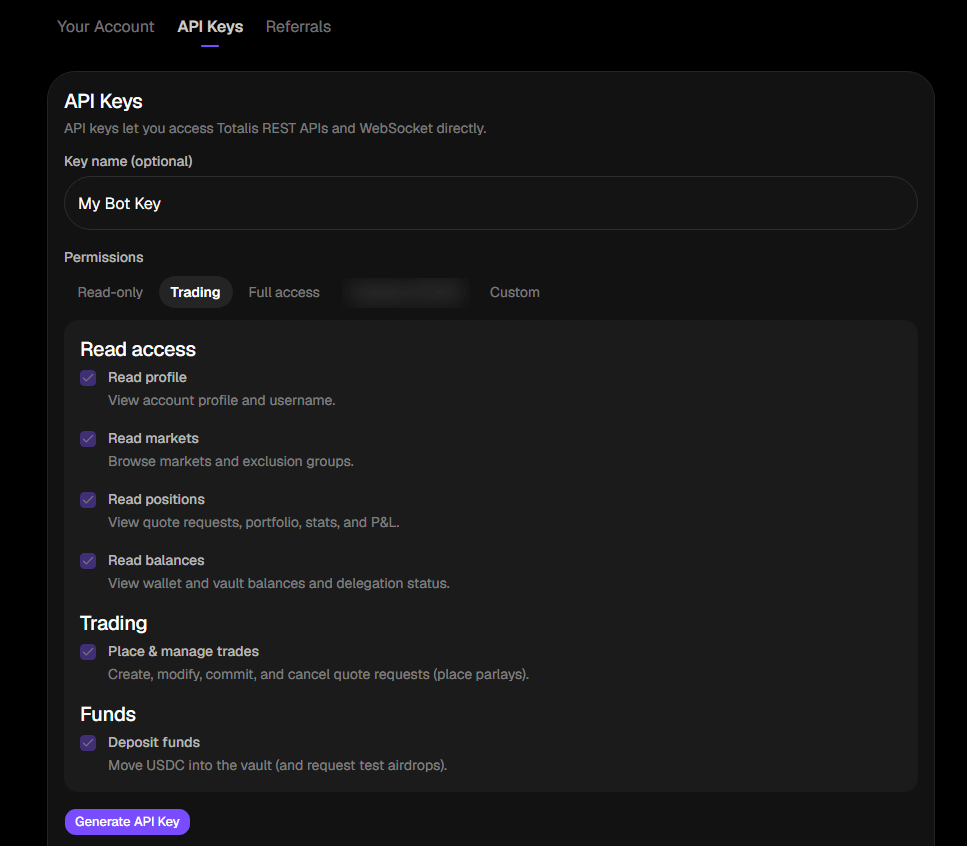
Create a key from the [Totalis Dashboard](https://app.totalis.trade), under account settings, then
API keys. Give it only the scopes (permissions) your integration needs. For a read-only start,
`account:read`, `positions:read`, and `balances:read` are enough. The full scope catalog is on
[Authentication](/solana/authentication).
 Copy the key when it is shown. It is displayed exactly once and cannot be retrieved later.
Store it in an environment variable:
```bash theme={null}
export TOTALIS_API_KEY="api_live_..."
```
## 3. Make your first authenticated call
Every request to `https://api.totalis.trade` carries your key in the `X-API-Key` header. Confirm it
works by reading your profile:
```bash theme={null}
curl https://api.totalis.trade/v1/me \
-H "X-API-Key: $TOTALIS_API_KEY"
```
```json theme={null}
{
"data": {
"id": "did:privy:...",
"username": "satoshi",
"wallet_address": "7Xy..."
}
}
```
Every successful response wraps the resource in a `data` envelope.
| Response | Meaning |
| - | - |
| `200` | The key works. |
| `401` | The key is missing, invalid, or revoked. |
| `403` | The key is valid but lacks the scope for this endpoint, or does not start with `api_`. |
## 4. Read your account
Pull your balances, open positions, and stats in one call:
```bash theme={null}
curl https://api.totalis.trade/v1/portfolio \
-H "X-API-Key: $TOTALIS_API_KEY"
```
## 5. Before you can trade
Reads work as soon as your key does. Placing a parlay needs two more things:
Send native Solana USDC to the address from
[`GET /v1/wallet`](/solana/api-reference/user/get-wallet). When you place a parlay, the stake moves
into your on-chain vault by itself. See [Funding](/solana/guides/funding).
A one time consent in the app that lets Totalis sign trades on your behalf. You cannot do this
from the REST API. Check the current state with
[`GET /v1/wallet/delegation-status`](/solana/api-reference/funds/delegation-status).
## Next steps
The full path from quote request to settlement.
Bet range, leg counts, timing windows, and both fees.
Positions, history, settlement outcomes, and P\&L.
Every field name and unit convention, defined once.
This documentation is built and hosted on [Mintlify](https://mintlify.com), a developer documentation platform.
Copy the key when it is shown. It is displayed exactly once and cannot be retrieved later.
Store it in an environment variable:
```bash theme={null}
export TOTALIS_API_KEY="api_live_..."
```
## 3. Make your first authenticated call
Every request to `https://api.totalis.trade` carries your key in the `X-API-Key` header. Confirm it
works by reading your profile:
```bash theme={null}
curl https://api.totalis.trade/v1/me \
-H "X-API-Key: $TOTALIS_API_KEY"
```
```json theme={null}
{
"data": {
"id": "did:privy:...",
"username": "satoshi",
"wallet_address": "7Xy..."
}
}
```
Every successful response wraps the resource in a `data` envelope.
| Response | Meaning |
| - | - |
| `200` | The key works. |
| `401` | The key is missing, invalid, or revoked. |
| `403` | The key is valid but lacks the scope for this endpoint, or does not start with `api_`. |
## 4. Read your account
Pull your balances, open positions, and stats in one call:
```bash theme={null}
curl https://api.totalis.trade/v1/portfolio \
-H "X-API-Key: $TOTALIS_API_KEY"
```
## 5. Before you can trade
Reads work as soon as your key does. Placing a parlay needs two more things:
Send native Solana USDC to the address from
[`GET /v1/wallet`](/solana/api-reference/user/get-wallet). When you place a parlay, the stake moves
into your on-chain vault by itself. See [Funding](/solana/guides/funding).
A one time consent in the app that lets Totalis sign trades on your behalf. You cannot do this
from the REST API. Check the current state with
[`GET /v1/wallet/delegation-status`](/solana/api-reference/funds/delegation-status).
## Next steps
The full path from quote request to settlement.
Bet range, leg counts, timing windows, and both fees.
Positions, history, settlement outcomes, and P\&L.
Every field name and unit convention, defined once.
This documentation is built and hosted on [Mintlify](https://mintlify.com), a developer documentation platform.