Scoped API keys: how to get one, how to send it, the scope catalog, and how to manage and revoke keys.
Every authenticated request carries your API key. On REST and the quote streams, send it in the
X-API-Key header. On the WebSocket, send it in the first message. Keys are scoped, so a key can
read without being able to trade, and trade without being able to withdraw.
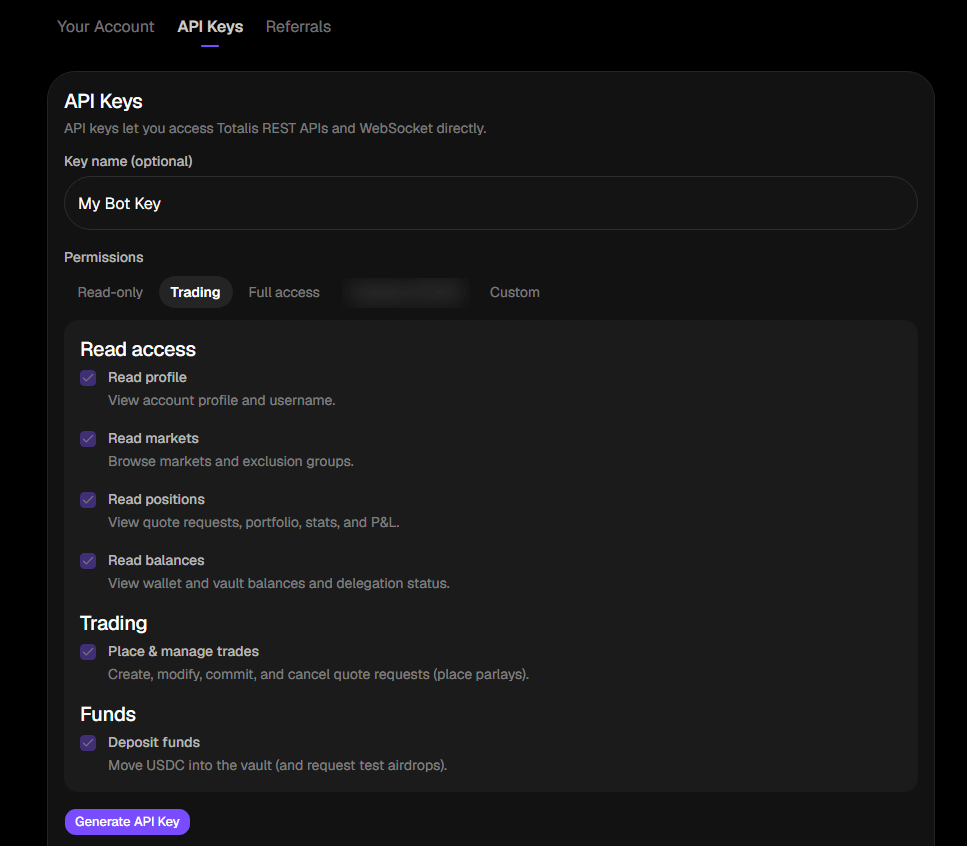
Name it and choose its scopes. Grant only what this integration needs. The presets map to the
scopes below: Read-only is the four read scopes, Trading adds trading:write
and funds:deposit, and Custom lets you tick scopes one by one. The API also accepts a
full preset. See Create API key.
Creating a key with the Trading preset. Each checkbox is one scope from the catalog below.
3
Copy it immediately
The full key is returned exactly once, in data.key.
The only time the full key is visible
Store the key in a secret manager before you close the dialog. It cannot be retrieved later, only
revoked and replaced.
Keys match api_(live|test)_[A-Za-z0-9_-]{28,36}. Every key you create is a live key and starts
api_live_. There is no public test environment. Start with small real bets, or email
founders@totalis.trade if you need a staging setup.
The web app authenticates with a Privy JWT (Authorization: Bearer <jwt>) instead of a key. Every
endpoint accepts either. Creating, listing and revoking keys needs keys:manage. A Privy session
always holds it. A key holds it only if you granted it.
A key holds the scopes you chose at creation. A request that needs a scope the key lacks gets 403
with reason insufficient_scope.
Scope
Grants
Risk
account:read
View account profile and username.
low
markets:read
Browse markets and exclusion groups. Market reads are public today, so no public endpoint checks it.
low
positions:read
View quote requests, parlays, stats, and P&L. Portfolio also needs balances:read.
low
balances:read
View wallet and vault balances and delegation status.
low
funds:deposit
Move USDC into the vault.
low
trading:write
Create, modify, commit, and cancel quote requests. Places parlays.
medium
account:write
Change username and profile settings.
medium
mm:quote
Read quote requests and submit or confirm quotes as a market maker.
medium
funds:withdraw
Move USDC out of the vault or wallet to any address.
high
tx:sign
Submit arbitrary signed Solana transactions.
high
keys:manage
Create, list, and revoke API keys.
high
Each high-risk scope lets a leaked key take everything. funds:withdraw sends USDC to any address.
tx:sign submits arbitrary transactions. keys:manage mints more keys, including ones that outlive
your revocation of the original. Grant them only to keys that need them, and never to a key that
lives in a browser or a CI log.
Scopes by integration:
Integration
Scopes
Dashboard or reconciliation, read only
account:read, positions:read, balances:read
Trading bot
the four read scopes, plus trading:write, plus funds:deposit if it tops up the vault
Market maker
the four read scopes, plus mm:quote, plus funds:deposit if you park collateral in the vault
{prefix} is the key_prefix value returned by both list and create: the short leading fragment
that listings show in place of the full secret. The app shows each key’s prefix, scopes, request
count and state, with a Revoke control on active keys.
The key list in the app. Only the prefix of each key is ever shown again.
A new key can never grant a scope the creating credential does not already hold. A key with
positions:read cannot mint a key with funds:withdraw.
Keys you create yourself never expire, so they reach the Expired state only if they were minted with
an expiry.Revocation takes effect immediately. Revoking one key among several does not stop webhook delivery,
because webhook endpoints belong to your account, not to the key that created them. See
Webhooks.