

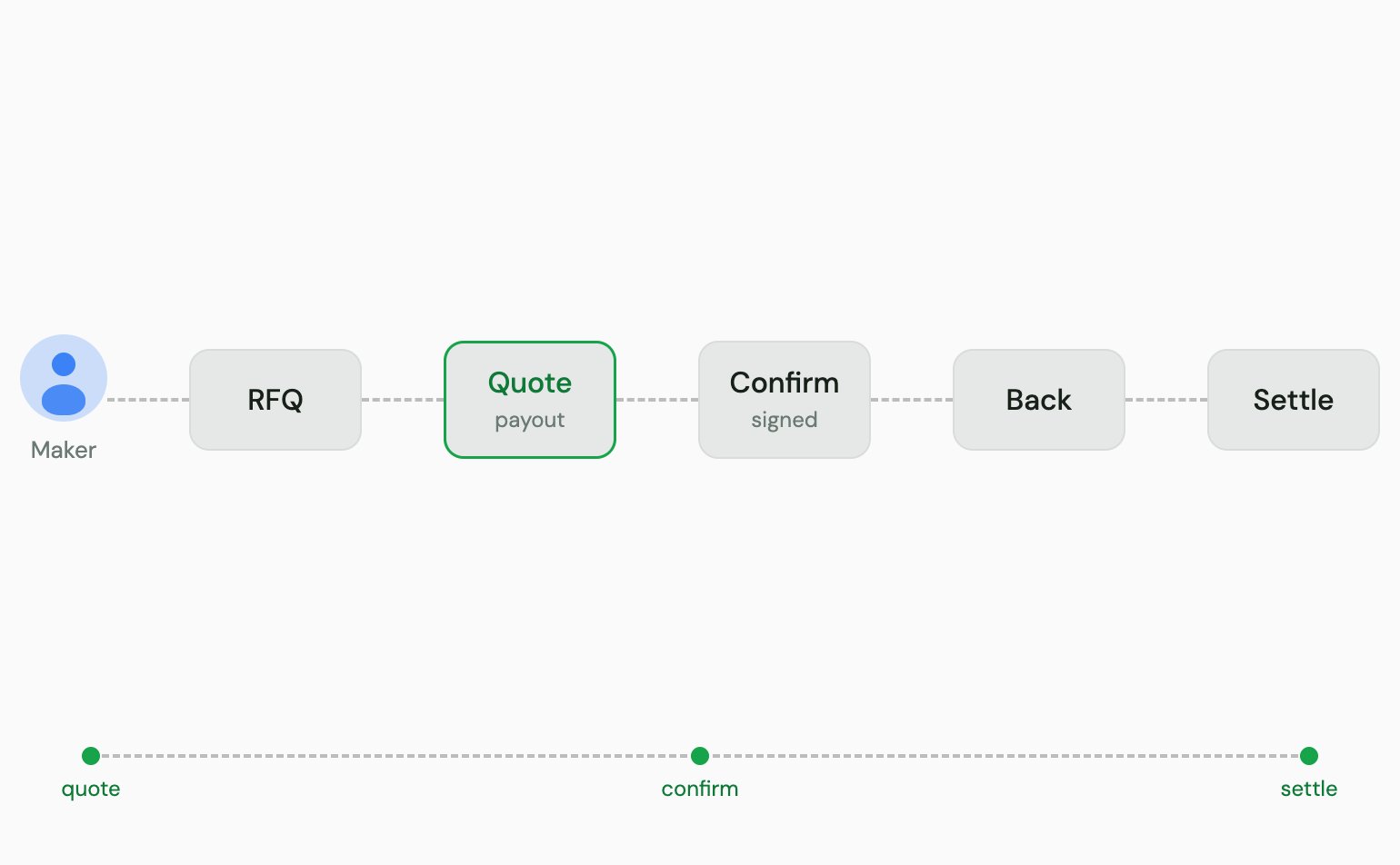
How it works
1
Receive RFQs
Subscribe to the maker channel. The snapshot holds every open RFQ,
and
RFQ_CREATED adds each new one: its legs, stake and taker. The RFQ carries no price.
Price each leg from your own Hyperliquid market data.2
Quote
Create a quote with the
payout you will pay
if every leg wins. It is unsigned and reserves nothing. Quote again to replace it, or
cancel it.3
Confirm the fill
When a taker accepts, you get
QUOTE_ACCEPTED with the exact terms and a deadline seconds
away. Sign the terms and confirm, or decline.
Totalis puts the trade on-chain. A missed deadline fills nothing.4
Back the position
The taker’s net stake moves into your maker vault and the position’s worst case locks. Totalis
settles it when the markets resolve: you keep the stake, or pay the winnings.
Endpoints
Every keyed route below takes your quoting key, except Lower your collateral, which takes your collateral key. Get deployment needs no key.
/mm shows your maker read-only: its onboarding state, balances, keys, a
pending withdrawal, positions, quotes and performance. It has no buttons that act. Its position, exposure
and performance pages read routes that only the app’s session can call; a bot reads the same facts from the
routes above. Every write runs headless through the SDK or the API:
Set up
You sign up once in a browser. Everything after that runs headless.In a browser, once
1
Get access
Totalis is invite-only for now. Email founders@totalis.trade for access and
an invite code. Sign up at app.totalis.trade with Google or email. Your
account gets a wallet embedded in the app: that wallet is your maker wallet.
2
Export the wallet key
In Account, under Private key, choose Export private key. Keep it only where your bot runs, as
TOTALIS_WALLET_KEY. It signs your sign-ins, your keys’ approvals, your vault transactions and every confirm.Headless
Fund your wallet first (step 2). Thenexamples/onboard.mjs in the SDK signs in, opens
and admits your maker, issues the quoting key, makes the first deposit and starts a bot. It does not issue the
collateral key. It prints the quoting key once: store it as TOTALIS_MAKER_KEY. Run it again with that set to resume:
each step skips what is already done, and it deposits only while the maker vault is empty.
On staging, sign up at hip4-staging.totalis.trade
with the staging invite code, and run with
TOTALIS_ENVIRONMENT=staging. In the steps below, set environment to "staging": the sign-in
then uses the staging app’s origin, https://hip4-staging.totalis.trade.1
Sign in
Sign in with the wallet key and the Totalis app’s origin, A session lasts at most 30 days and ends after 7 days unused
(Limits). Then sign in again the same way. You need a
session only to open and admit your maker and to manage its keys. Your bot runs on its maker key.
https://app.totalis.trade. Send the same origin
as the Origin header with every request on the session.2
Fund your wallet
Send HYPE for gas and the USDC you will quote with to your maker wallet on HyperEVM. Makers are never
sponsored: your wallet pays the gas for every vault transaction.
3
Open and admit your maker
Send
openMakerVaultTransaction(deployment, wallet.address) from your wallet. A wallet opens one maker.
waitForMaker waits until Totalis has indexed it, admits it (Admit maker)
and returns its makerId.send is your own: the SDK builds each { chain_id, to, data, value } and never sends a transaction. With
viem it is walletClient.sendTransaction, then waiting for the receipt.4
Create your keys
Issue the quoting bot’s key, approved by your wallet’s signature. Its scopes cannot move vault money.
Copy the secret: it is shown once.A key stops working at its expiry. Rotate it before then (Manage keys), or pass
expires_in_days: 0 for a key that lasts until you revoke it.5
Fund the maker vault
Approve USDC for the vault, then deposit it. Both come from your wallet.
Partner-admitted wallet
A partner can run its maker from a wallet it admits (Onboard a user) instead of a Totalis app account. There is no browser step: admit the wallet, then follow the headless steps above, signing in with one of your registered origins instead of the Totalis app’s. With the example, call its exportedonboard with that origin.
- Use a wallet of its own, not your builder signer. A wallet opens one maker.
- It signs in again whenever it needs a session, to manage its keys.
- It holds no vault balance of its own, like an app wallet that controls a maker (Cash-outs).
Manage keys
Your wallet manages your maker’s keys from a wallet session (Headless, step 1). An API key cannot create, rotate or revoke keys. /mm lists them with their status, read-only.
Create, rotate, revoke has the approval and the overlap rules,
and Scopes the two maker scope sets.
Fund and withdraw
Your wallet sends every vault transaction and pays its gas in HYPE.maker.controller() builds each one on a
maker key, or controllerTransactions(deployment, makerId, wallet.address) without one.
/mm shows a pending withdrawal and its countdown, read-only. Move maker funds
has every vault call and its reverts.
Your maker wallet
Your maker is one wallet: your Totalis account’s own wallet. Totalis admits a maker only from that wallet, so your
bot holds its key: the exported embedded wallet for an account created in the app, or your own key for a wallet a
partner admitted (Partner-admitted wallet). Nothing fills without your confirmation
signature, so to stop filling, stop confirming.
The vault cannot move a maker to another wallet.
- If the key leaks, email founders@totalis.trade at once. Totalis can cancel a pending maker withdrawal during its delay. Then withdraw, and open a new maker from a new account.
- If the key is lost, the maker’s funds cannot be withdrawn.
- Never call the vault’s
setQuoteSigner. A maker whose signer is not its own wallet stops being served.
Price entries
Each market’s sides carry a Hyperliquidcoin, such as #12090 for YES of outcome 1209
(List markets). Read their books from Hyperliquid’s info API
or WebSocket by that coin. Books update many times a second: keep the latest book per coin and price from
it, rather than processing every update.
Before you quote:
- Read Get deployment for the current fees. A quote with other fees is refused.
- Check your capital: the latest
capitalframe if you subscribed withcapital, otherwise a read. Ifcontext.statusis notCURRENT, stop quoting until it is.
Hedge on Hyperliquid
A Combo leg is a Hyperliquid outcome side, so you can hedge it on that outcome’s HyperCore book.- Hyperliquid refuses an order worth under $10 (`Order must have minimum value of $10.`). Size hedges in steps of at least that, or net several Combos into one order.
- A leg and its outcome token settle on the same HyperCore result. Hyperliquid pays
settleFractionperYEStoken and1 - settleFractionperNOtoken, and the Combo leg’s result is the same fraction (Settlement).
Quote
An entry quote that could never fill is refused when you send it:
400 INVALID_REQUEST, with
field_violations naming the field.
A leg that has already settled returns
409 RFQ_NOT_OPEN. The minimum, the maximum payout and the window
are on Limits.
Quoting rules
- Price the net stake. The taker fee comes off
stakebefore it reaches you, so you riskpayout - net stake. - Your newest quote on an RFQ replaces your last one. The taker sees
QUOTE_REMOVEDfor the old one. - An entry quote can be accepted until its
accept_before. Quote again before it passes to stay on the RFQ. The RFQ stops taking new quotes atexpires_at, but a live quote stays acceptable until itsaccept_before. Neither sends an event. The windows are on Limits. - A quote reserves no collateral. Capacity is checked when you confirm, so quote only what
MAKER_QUOTEin your capital’sactionscovers (When collateral is checked). - A
409 RFQ_NOT_OPENmeans the RFQ closed, a newer one replaced it, or one of its legs settled. Drop it. - While a taker’s acceptance of your live quote on an RFQ waits for your answer and its
deadlinehas not passed, a new quote on that RFQ (entry or cash-out) returns409 STATE_CONFLICT. Nothing changes: the acceptance still waits for you. Confirm or decline it first, or wait for itsdeadline. Past thedeadlineit no longer blocks, and your new quote marks itTIMED_OUT. - An exact retry of a quote that already went through returns the original
quote_id.
Cancel a quote
CANCELLED or REPLACED means it is off the RFQ. A 409 with { "status": "ACCEPTED" } means you already
confirmed it: it is filling, and cannot be cancelled.
While a taker’s acceptance of the quote waits for your answer, cancel returns 409 STATE_CONFLICT (an error
body) and changes nothing. To refuse the fill, confirm with { "decision": "DECLINE" }. Once the
acceptance is answered or past its deadline, the cancel goes through, so repeating it is safe. Past the
deadline, cancelling marks the acceptance TIMED_OUT.
Quote lease
A lease pulls your quotes if your bot goes quiet, so takers don’t accept quotes no one will confirm. Arm it, and renew it well insidelease_ms, for example every third of it:
expires_at, Totalis cancels each of your open quotes no taker is
accepting, and every quote you publish after, until you renew or release it. The lease covers the whole maker,
whichever key renews it. It takes no Idempotency-Key. Release it with DELETE on the same path. The range
is on Limits.
Confirm
QUOTE_ACCEPTED carries the exact terms, named by kind. Check them against what you quoted, and check your
price and your capital still hold. Then sign them (entry as Quote, sell_back as SellBack) and answer
with no Idempotency-Key:
Follow
operation_id on OPERATION_UPDATED. COMMITTED means filled. REVERTED or
EXPIRED_UNEXECUTED means nothing filled: the contract checks your capital and the terms again when the trade
lands, and an entry with taker funding also expires unsent when that funding does not arrive in time. Every confirm is checked against your capacity first
(When collateral is checked). On an RFQ without
intent_id, that check is skipped while Totalis’s view of the chain lags, and the vault decides, so an ACCEPTED
fill can still revert. Keep following OPERATION_UPDATED.
{ "decision": "DECLINE" }needs no signature. Decline when your price or your capital moved.- The confirm deadline is on Limits. It is short, so sign on a hot path: keep the deployment and your signer loaded, and answer before any slow work.
- A lost response: resend the same answer. Until you know the outcome, treat the quote as filled.
Automatic RFQs carry
intent_id: every RFQ the Totalis app opens, and any RFQ a taker opens with one
(Maker channel). Every code is on
Errors.
After a restart
Subscribe from your saved cursor. OnREPLAY, the replayed QUOTE_ACCEPTED events carry what arrived while you
were away. On SNAPSHOT or RESET, the snapshot’s acceptances holds the acceptances still waiting for you,
earliest deadline first; if truncated lists it, page the rest. Either way,
List acceptances returns every one still waiting: follow
next_cursor until has_more is false. Answer each
one before its deadline, and don’t quote those RFQs again first. Keep the quote_ids you created in durable
storage, so a restarted bot confirms only terms it published.
Profit and loss
A position payseffective = payout * r1 * r2 * ..., rounded down, where each r is a leg’s result: 1 for a
win, 0 for a loss, or a fraction (Settlement).
The profit fee comes out of the owner’s winnings, and a sell-back’s fee out of the owner’s proceeds
(Cash out). Neither comes from your vault.
Read the positions you back with List positions
and your fills and settlements with List activity, both with
your maker key.
settlement_kind and each leg’s result are on
Trading.
Collateral
Each fill locks the position’s worst case in your maker vault:payout - net stake. Positions that
cannot all win together can share that collateral once you run a collateral reduction.
Maker collateral has every capital field, how each step moves it, and how
to reduce it.
Cash-outs
A taker can sell an open position before it settles. Totalis opens a cash-out RFQ to the maker that backs the position, and only to it:RFQ_CREATED with kind: CASHOUT, the position_id, its owner, your
maker_id, its net_stake and payout, and the leg state to price against. Other makers never see it.
position_id, owner and leg_state are copied from the RFQ. quote_id is the EIP-712 digest of
sell_back as SellBack. The expiry window is on Limits.
Price a cash-out
leg_state is keccak256(abi.encode(states)), with one uint256 per leg in order:
(code << 64) | value. code is 0 for an open leg, 1 for a resolved leg and 2 for a pruned leg.
For a resolved leg, value is the outcome’s resolved value out of 100000000, the same for either side: a
YES leg’s result is value / 100000000, and a NO leg’s is (100000000 - value) / 100000000. It is 0
otherwise. To check it, call the vault’s view legStateOf(Leg[] legs, uint256 readGas) with legs and
decision_read_gas at decision_block.
- Price from current books, not from
decision_block. Drop legs already resolved as wins. - A position with a lost leg is worth nothing. Bid on a leg resolved to a fraction, or pruned, only if you can value it.
- The sale lands only while every leg’s state still equals
leg_state. If a leg moves first, the trade reverts and nothing moves.
Compatibility
RFQs, acceptances, capital and events gain fields and enum values as the API grows. A bot that rejects an unknown field stops quoting the day one ships. Ignore fields you don’t know, and treat an unknown enum value as a state you can’t act on (Compatibility).Maker collateral
Capital, how fills move it, and collateral reduction.
Real time
Hold the maker channel and resume it without missing a fill.
TypeScript SDK
createMaker: quote, confirm and reduce collateral in a few lines.Errors
Every code, and which to retry.